
The routing table, the next hop and the default gateway
What a routing table entry contains, how a device picks the longest matching prefix and its next hop, and what the default gateway and the default route actually are.
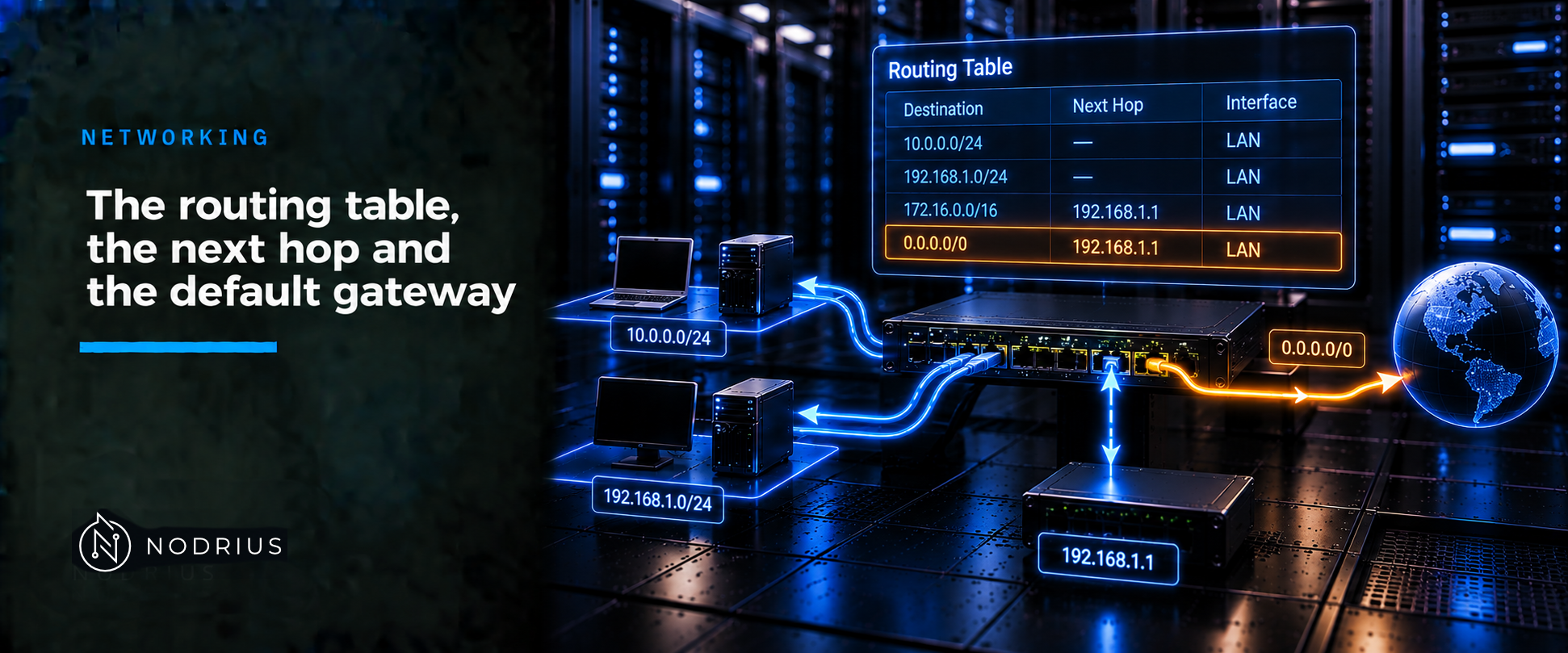
A routing table is the list of forwarding decisions a device has already made: for each destination prefix, which next hop to use. A destination address is matched against that list; the most specific prefix wins, and its entry gives the next hop — an address on a network the device can already reach — and the outgoing interface. The default route, 0.0.0.0/0 in IPv4 and ::/0 in IPv6, has prefix length zero: it matches every destination, so it is used only when nothing more specific matches. A host that does not route keeps the same idea in one setting, its default gateway.
The model: a table of prefix to next hop
One question drives the mechanism: for this destination, what is the next hop? The device stores one step, never the whole path; the next device repeats the decision.
one row per destination prefix
  prefix               next hop         out      source
  0.0.0.0/0            192.0.2.1        Gi0/1    static default
  198.51.100.0/24      192.0.2.2        Gi0/1    learned (OSPF)
  198.51.100.128/25    198.51.100.1     Gi0/1    directly connected

destination 198.51.100.200
      matches /0, /24 and /25   ->  longest match wins: /25
      ->  next hop 198.51.100.1, out Gi0/1
The next hop is the adjacent host or router the packet is sent to next — adjacent meaning reachable without passing through another router (RFC 1812). That is what keeps the table small: only one step must be reachable.
Terms
- Routing table — the record of the best route the device knows to each destination prefix; in routing terminology, the RIB (Routing Information Base).
- Next hop — the adjacent device the packet is handed to: the destination itself if it is on-link, otherwise a router.
- Default route / gateway of last resort — the zero-length-prefix route, used when nothing more specific matches.
- Default gateway — the next-hop router a host uses for destinations it cannot reach on its own link.
- Metric and administrative distance — local values used to choose between entries for the same prefix; administrative distance is Cisco’s implementation of what RFC 1812 describes as an administrative preference, a suggested tie-break.
The mechanism, step by step
- If the destination is on a directly connected network, the packet goes straight to it; otherwise a router is needed (RFC 1122).
- The device looks the destination up. Of every entry whose prefix contains the address, the longest prefix is kept — a requirement, not a preference: routers must use the most specific matching route (RFC 1812).
- That entry fixes the next hop and the outgoing interface. The next hop must be adjacent, so it has to lie on a network the device already reaches.
- For one prefix, several sources can compete — connected, static, a routing protocol — and the device installs the lowest administrative distance, then the lowest metric (Cisco defaults: connected 0, static 1, then the protocols; 255 is never trusted).
- A default route is an entry with prefix length zero, so it is the last candidate: any longer matching prefix removes it. IPv4 writes it
0.0.0.0/0, IPv6::/0. - A host rarely builds a table: in IPv4 its default gateway usually comes from DHCP option 3, a list of routers in order of preference; in IPv6 it learns default routers from Router Advertisements (RFC 4861; RFC 4191).
- The decision repeats at the next device; each router uses only the destination address, and no path is recorded in the packet.
Reading the table on Cisco IOS XE
Reference platform: Cisco IOS XE; the syntax is platform-specific, the model is portable.
show ip route                    # the IPv4 routing table
show ip route <destination>      # the one winning entry, and why
show ipv6 route                  # the IPv6 routing table
show ip route prints a legend of source codes, the gateway of last resort, then one line per destination: a source letter, the prefix, a bracket of [administrative distance/metric], the next hop after via, and the outgoing interface. show ip route <destination> narrows this to the winning route.
ip route 0.0.0.0 0.0.0.0 <next-hop>     # static default route; IP routing must be enabled
ipv6 route ::/0 <next-hop>              # IPv6 default route; ipv6 unicast-routing first
ip default-gateway <address>            # default gateway when IP routing is disabled
ip default-gateway is for a device that is not routing at all, such as a Layer-2 switch; there ip route has no effect. The forms of ip route belong to the static routing sheet.
Warning: changing or removing a route, especially a default route, can move live traffic or black-hole it; verify reachability before and after.
Limits and the common mistake
The common mistake is reading [administrative distance/metric] as the value that decides between two different prefixes. It does not: prefix length decides first, and a longer, more specific route always wins, however poor its metric. Distance and metric only choose between sources offering the same prefix.
- A route is usable only if its next hop can be resolved through another entry, normally a directly connected one.
- The table is control-plane state; forwarding uses the forwarding table built from it — Cisco’s FIB (Forwarding Information Base). They normally agree, so a disagreement is a real fault.
- A default route is not a security boundary: all off-link traffic goes to one next hop, so the gateway is a single point to protect and monitor.
Level and prerequisites
L2 — operational. It assumes the L1 material on prefixes and the local-versus-gateway decision ( IPv4 and IPv6: prefixes, subnets and the default gateway) and the hop-by-hop view of forwarding ( OSI and TCP/IP: how a packet actually travels), without re-explaining them.
Where to go next
- Networking — the area this sheet belongs to.
References
- RFC 1812 — Requirements for IPv4 Routers: the most specific matching route (§2.2.5.2); the next hop definition, longest match and the default route as the zero-length prefix (§5.2.4.3); administrative preference as a suggested tie-break (§5.2.4.4).
- RFC 1122 — Requirements for Internet Hosts: routing outbound datagrams, the local/remote decision and default-gateway selection (§3.3.1.1–3.3.1.2); a configurable list of default gateways (§3.3.1.6).
- RFC 4861 — Neighbor Discovery for IPv6: the Default Router List and the Router Lifetime field.
- RFC 4191 — Default Router Preferences and More-Specific Routes: the High / Medium / Low preference.
- RFC 2132 — DHCP Options and BOOTP Vendor Extensions: the Router Option (code 3), routers listed in order of preference.
- RFC 5737 — IPv4 address blocks reserved for documentation (the example addresses).
- Cisco — IP Routing Configuration Guide, Cisco IOS XE 17.x: Basic IP Routing (static and default routes,
ip default-gateway, gateway of last resort, administrative distance). - Cisco — Understand Administrative Distance: default administrative-distance values and longest prefix match in the FIB.
- Cisco — IPv6 Routing: Static Routing, Cisco IOS XE 17.x:
ipv6 route,::/0,ipv6 unicast-routing,show ipv6 route. - Cisco — Configure a Gateway of Last Resort that Uses IP Commands: fields of
show ip route.